macOS · iOS · iPadOS · watchOS
Your AI coding usage
at a glance.
抬手就能看
AI 编程额度
QuotaGlance tells you how much of your AI coding plan is left and exactly when it resets. It works with your Codex and Claude accounts — one of them is enough.
码量(QuotaGlance)随时告诉你 AI 编程额度还剩多少、什么时候重置。支持你的 Codex 与 Claude 账号,只用其中一个也可以。
- Percentage left, with a live reset countdown
- 剩余百分比与重置倒计时
- Three alert thresholds
- 三级阈值提醒
- Widgets and watch complications
- 小组件 / 表盘复杂功能
- Syncs only to your own iCloud
- 只同步到你自己的 iCloud
A Mac is optional. Sign in on your iPhone and it reads your quota directly. If you would rather not sign in on iPhone, the Mac app can collect quota and sync it to your iPhone and Apple Watch through your own private iCloud database. Nothing passes through a developer server.
Mac 是可选的。在 iPhone 上登录,它就直接读取你的额度。如果你不想在 iPhone 上登录,也可以由 Mac 版采集,经你自己的 iCloud 私有数据库同步到 iPhone 与 Apple Watch。全程不经过开发者服务器。
How it works
工作原理
Two ways to get your numbers
两条取数路径
Pick either one. Signing in on your iPhone is the shortest path and needs no Mac at all. Letting a Mac collect for you is the alternative if you would rather not sign in on your phone.
两条选一条就够。在 iPhone 上登录是最短的一条,完全不需要 Mac;如果你不想在手机上登录,就让 Mac 替你采集。
A · Sign in on iPhone
Open Settings in the app and sign in to your Claude or Codex account. From then on this iPhone reads your quota directly from the provider, with no Mac involved. Your Apple Watch and your widgets follow along.
方式 A · 在 iPhone 上登录
在 App 的设置页登录 Claude 或 Codex 账号。此后这台 iPhone 直接向服务商读取额度,全程无需 Mac。Apple Watch 和小组件也会跟着更新。
B · Let a Mac collect
Run the Mac app and it collects quota — through your account, or through a Codex CLI or Claude Code you already have set up. It syncs the readings to your own private iCloud database, where your iPhone and Apple Watch pick them up.
方式 B · 让 Mac 采集
把 Mac 版跑起来,它会采集额度——可以走账号直连,也可以走你本机已经配好的 Codex CLI 或 Claude Code。读数同步到你自己的 iCloud 私有数据库,iPhone 与 Apple Watch 从那里取用。
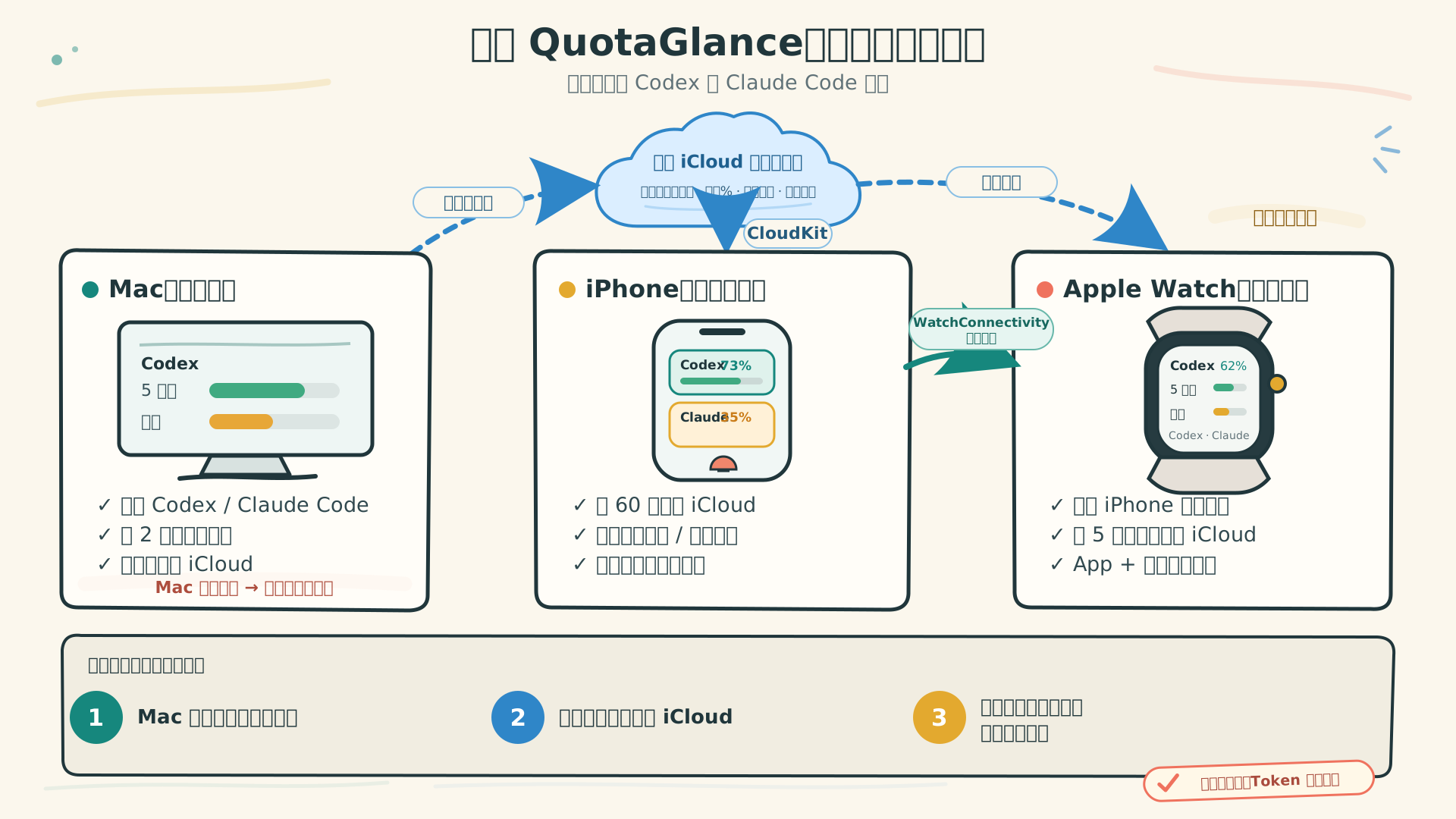
Path B in detail: how the three apps cooperate when a Mac does the collecting. 方式 B 的细节:由 Mac 采集时,三个端如何协作。 Swipe to see the full image, or 左右滑动查看全图,或 open it full size ↗查看大图 ↗
- Signed in on iPhone? You are done. Your phone reads quota on its own every 60 seconds and on every pull-to-refresh. Turning off your Mac changes nothing.
- 在 iPhone 上登录了?那就结束了。手机每 60 秒自己读一次,下拉也能手动刷新。关掉 Mac 没有任何影响。
- Relying on a Mac instead? It has to be running. Once you quit the Mac app, close the lid or shut down, your phone and watch keep showing the last known reading and keep counting down locally — but no new numbers arrive.
- 只靠 Mac 取数?那它必须开着。关掉 Mac App、合上盖子或关机之后,手机和手表会继续显示最后一次已知的数值并按本地时间倒计时,但不会有新数据。
- Sharing across devices needs one Apple Account. Readings travel through your own private iCloud database, never a third-party server, so every device has to be signed in to the same Apple Account.
- 跨设备共享需要同一个 Apple 账户。读数走的是你自己的 iCloud 私有数据库,不经过任何第三方服务器,所以几台设备必须登录同一个 Apple 账户。
- Apple Watch never signs in. It reads your private iCloud database on its own every 5 minutes and accepts fast pushes from a nearby iPhone, showing whichever reading is fresher.
- Apple Watch 不登录。它每 5 分钟自己读一次你的 iCloud 私有数据库,同时接收附近 iPhone 的快速推送,谁的读数更新就显示谁。
Features
功能
What you need to know, without opening the app
该知道的,不用打开 App 也知道
Quota left, and the countdown
剩余额度 + 重置倒计时
Two windows — the 5-hour session limit and the weekly limit — each with percentage left, a progress bar, a reset countdown, and how fresh the reading is. Every device shows what remains, never what you have used.
5 小时与每周两个额度窗口,各自显示剩余百分比、进度条、重置倒计时,以及这份读数有多新。三端一律显示剩余,不显示已用。
Three alert thresholds
三级阈值提醒
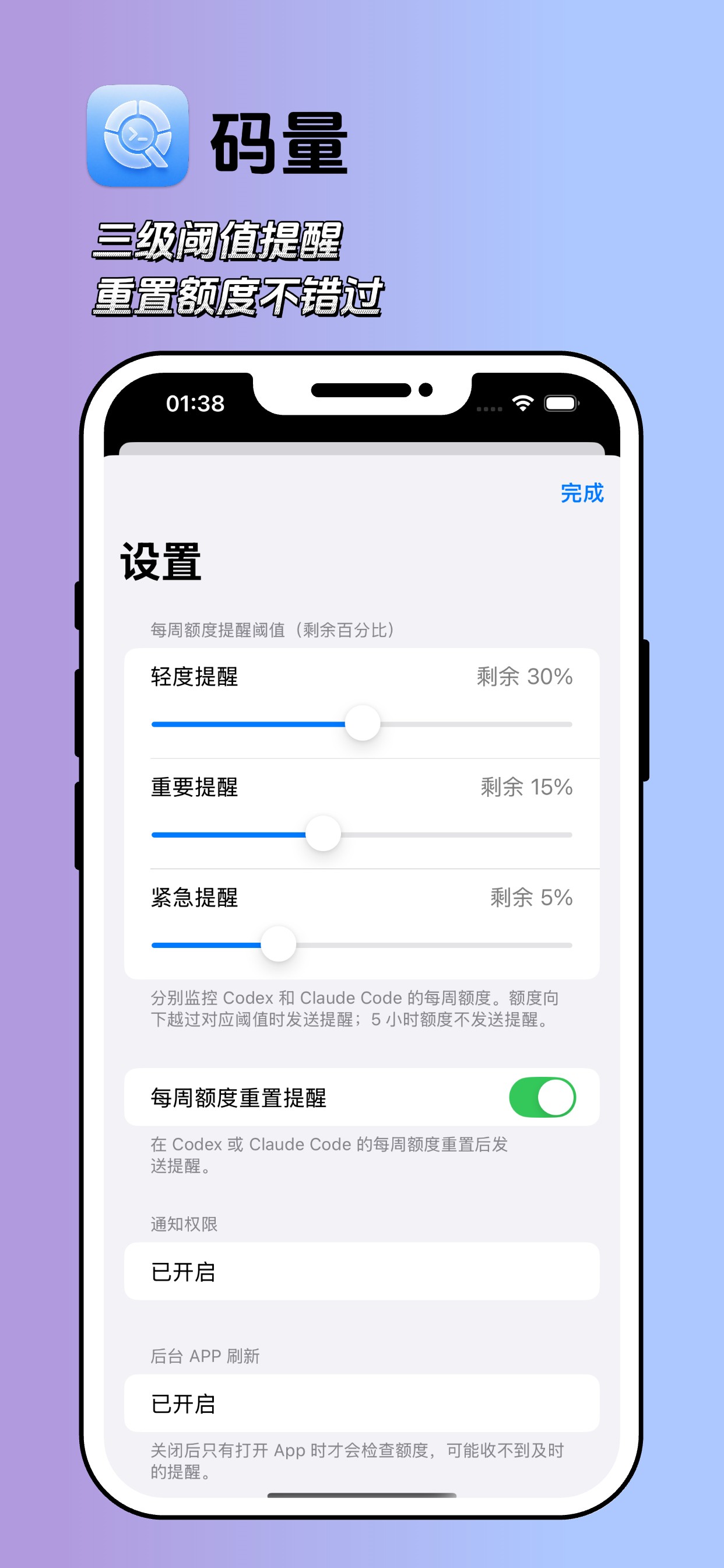
Heads-up at 30%, important at 15%, urgent at 5% — all adjustable. You also get a note when your weekly limit resets and you can carry on.
轻度 30%、重要 15%、紧急 5%,阈值可调。每周额度重置后也会提醒你「可以继续用了」。
Home Screen and Lock Screen widgets
主屏与锁屏小组件
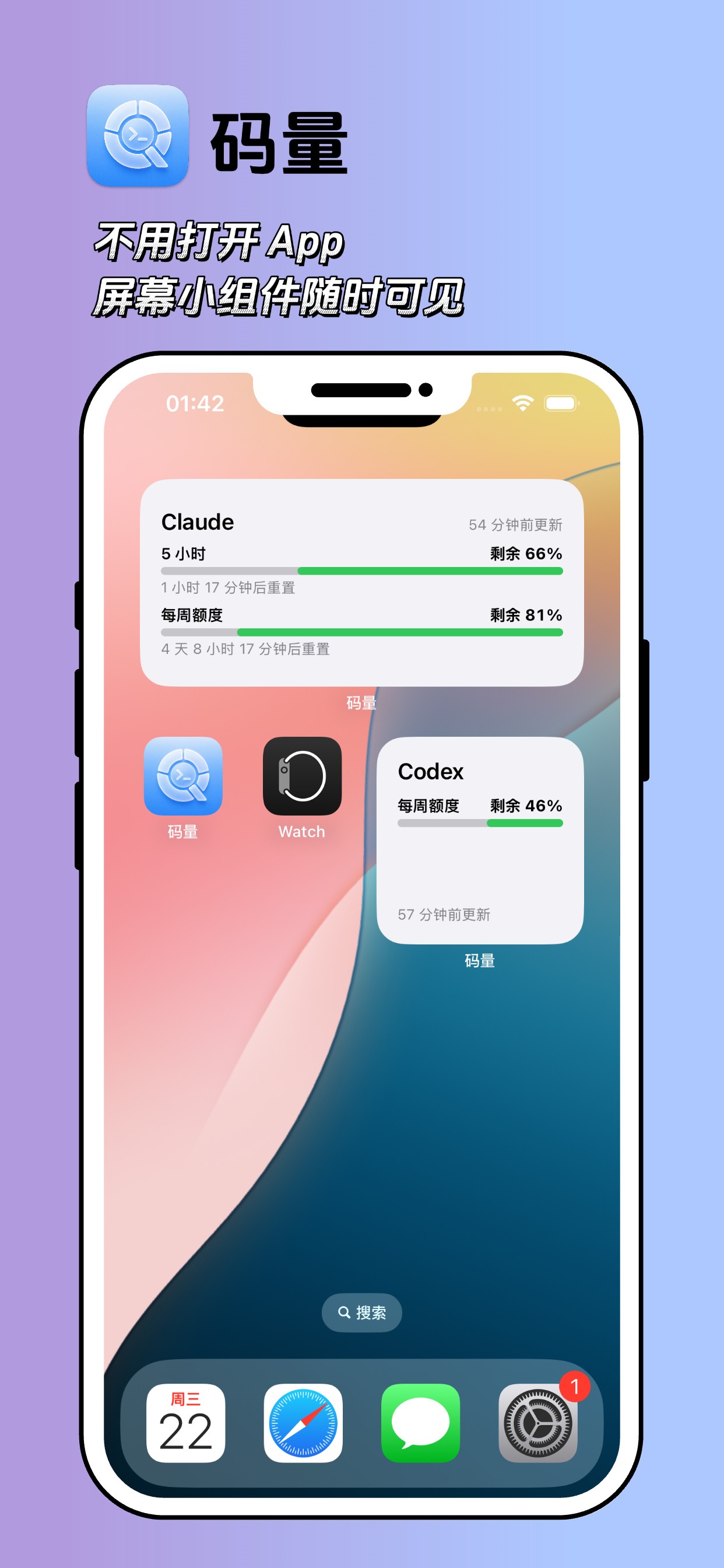
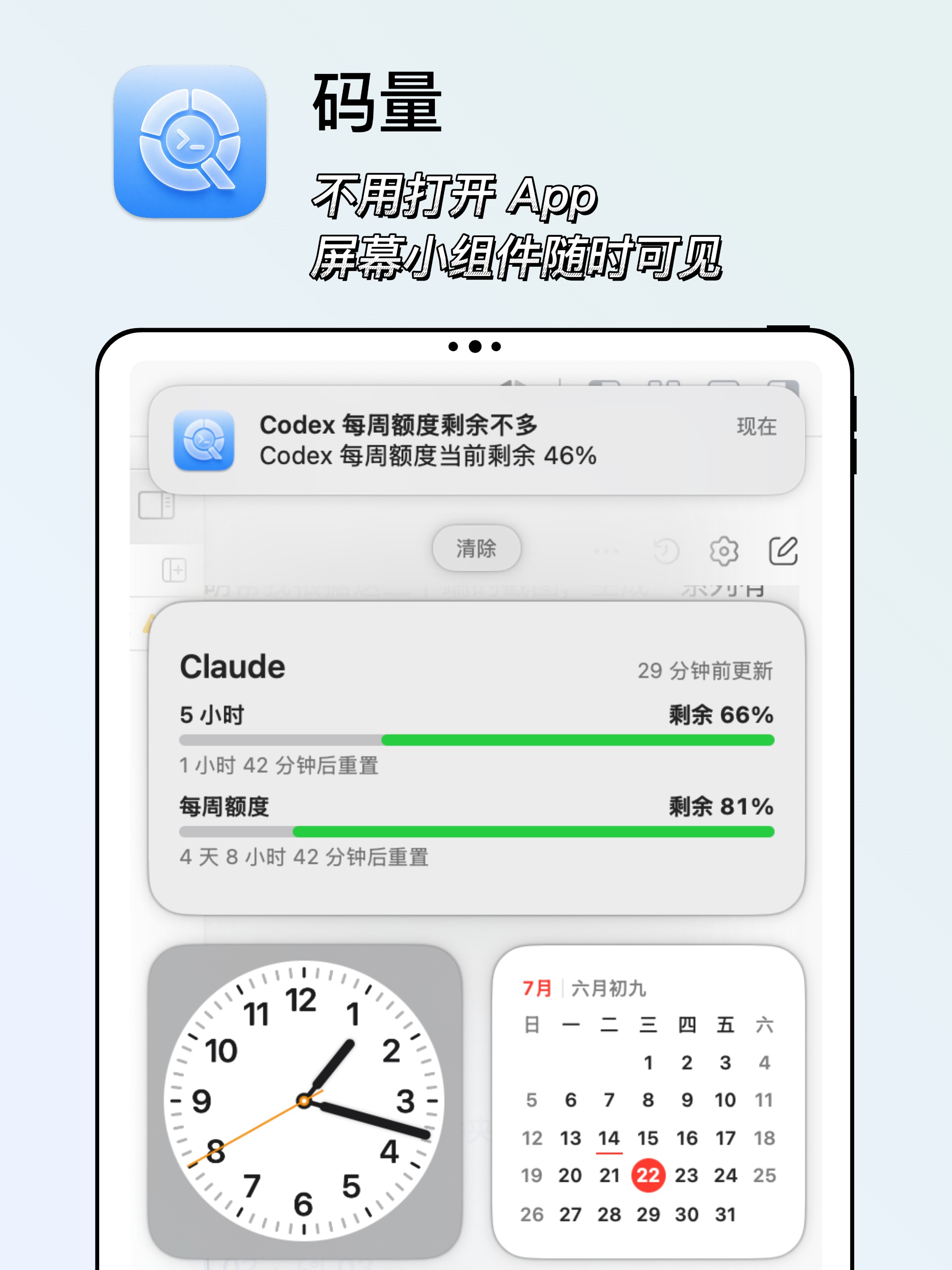
Small and medium on the Home Screen; circular, inline and rectangular on the Lock Screen. Long-press to switch a widget between Codex and Claude, or add two if you want both.
主屏小号、中号;锁屏圆形、行内、矩形。长按可在 Codex 与 Claude 之间切换,想两个都看就添加两个。
Watch complications
表盘复杂功能
Circular, corner, inline and rectangular. Two ready-made entries — "Claude quota" and "Codex quota" — so you pick one and it works.
圆形、表角、行内、矩形四种尺寸,提供「Claude 额度」和「Codex 额度」两个预配置条目,选中即用。
Two channels to your watch
手表的两条同步通道
A push from your iPhone is almost instant but needs the phone nearby. The watch also reads iCloud on its own every 5 minutes, so it updates even when your phone is not around. Whichever is fresher wins.
iPhone 推送几乎即时,但需要手机在附近;手表自己读 iCloud 每 5 分钟一次,即使 iPhone 不在身边也能更新。谁的数据新用谁的。
Privacy first
隐私优先
The only things that sync are the service name, the percentage left, the reset time and the capture time. Your code, conversations, account names, file paths and sign-in tokens never reach iCloud.
只同步服务名、剩余百分比、重置时间、采集时间。代码、对话内容、账号名称、文件路径和登录 Token 都不会同步到 iCloud。
Devices
各端界面
One set of numbers, four places to see it
一份数据,四个地方看
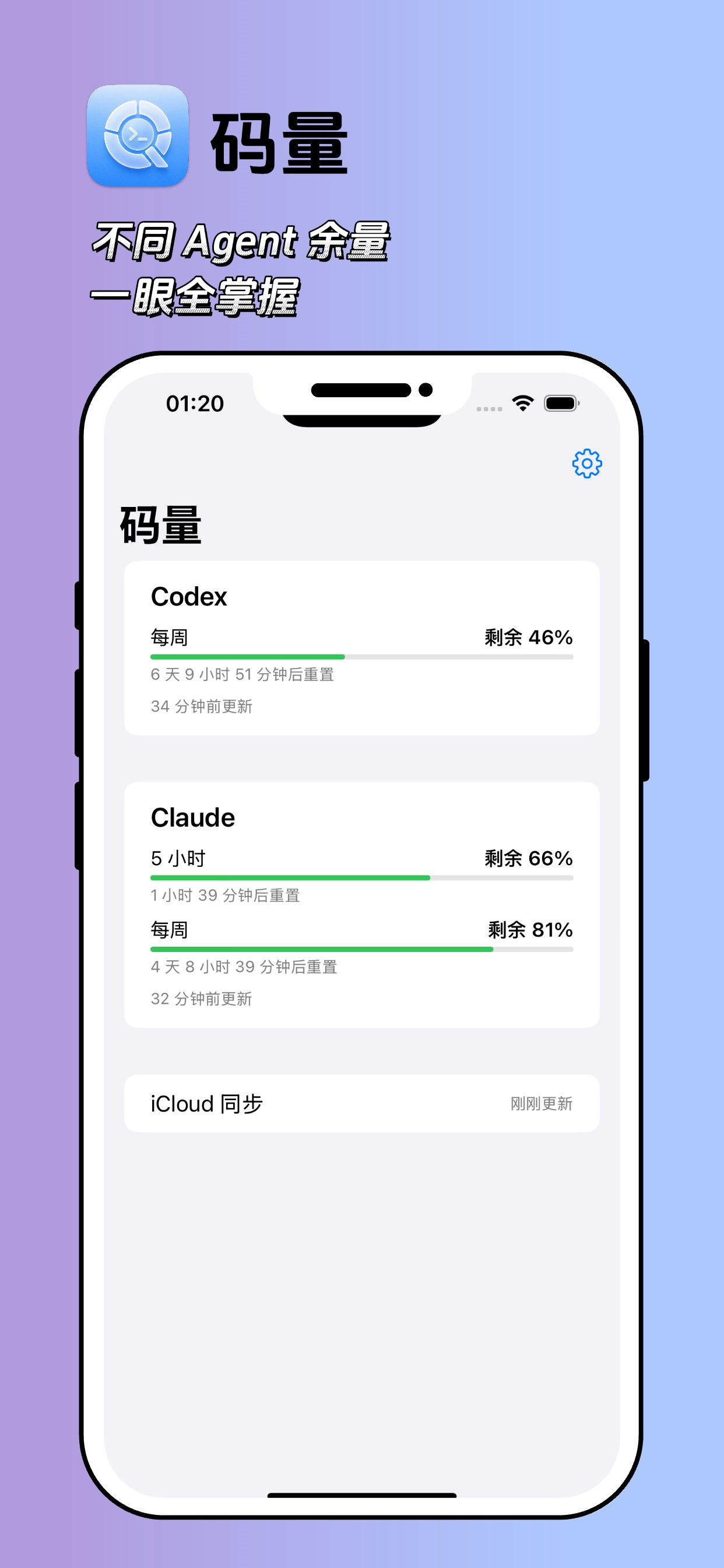
Up to two cards on the home screen — Codex and Claude. If only one is connected, you see one. The gear at the top right opens alert settings; the bottom row shows iCloud sync status.
首页最多两张卡片(Codex 与 Claude),只连了一个就只有一张。右上角齿轮进入提醒设置,底部一行显示 iCloud 同步状态。
- The iPhone and iPad app is on the App Store.
- iPhone / iPad 版已上架 App Store,搜索「码量」也能找到。
- Sign in under Settings to read quota directly on this iPhone — no Mac needed. Credentials stay in this device's keychain, never in iCloud or a backup.
- 在设置页登录,这台 iPhone 就能直接读取额度,不需要 Mac。凭据只保存在本机钥匙串,不进 iCloud,也不进备份。
- Each card shows, for both the 5-hour and weekly limits: percentage left, a progress bar and a reset countdown, with data freshness on the last line.
- 卡片对 5 小时和每周额度各显示:剩余百分比、进度条、重置倒计时,最下面一行是数据新鲜度。
- It refreshes on launch, on every return to the foreground, every 60 seconds in the background, and on pull to refresh.
- 刷新时机:App 启动、每次回到前台、后台每 60 秒一次,以及下拉手动刷新。
- Widgets refresh on the system's schedule (roughly every 15 minutes), not in real time. Offline, they keep showing the last value read successfully.
- 小组件由系统决定刷新时机(约每 15 分钟),不是实时的;离线时继续显示上次成功读到的数值。
- Alerts need notification and Background App Refresh permission. If either is denied, Settings shows a shortcut straight to iOS Settings.
- 提醒需要授权通知与后台 App 刷新;权限被拒时设置页会出现「去设置」直接跳系统设置。
| Setting | Default | Notes |
|---|---|---|
| 设置项 | 默认值 | 说明 |
| Heads-up alert | 30% left | Adjustable from 10% to 50% |
| 轻度提醒 | 剩余 30% | 可调范围 10%–50% |
| Important alert | 15% left | Adjustable from 5% to 30% |
| 重要提醒 | 剩余 15% | 可调范围 5%–30% |
| Urgent alert | 5% left | Adjustable from 1% to 15% |
| 紧急提醒 | 剩余 5% | 可调范围 1%–15% |
| Weekly reset reminder | On | Tells you when your weekly limit has reset and you can carry on |
| 每周额度重置提醒 | 开 | 每周额度重置后提醒你可以继续用了 |
Note: all three thresholds and the reset reminder apply to the weekly limit only. The 5-hour limit never sends a notification — it refills quickly enough that alerting on it would just be noise.
注意:三档阈值和重置提醒都只针对每周额度。5 小时额度不会发任何通知——它本来就恢复得很快,逐条提醒只会变成骚扰。
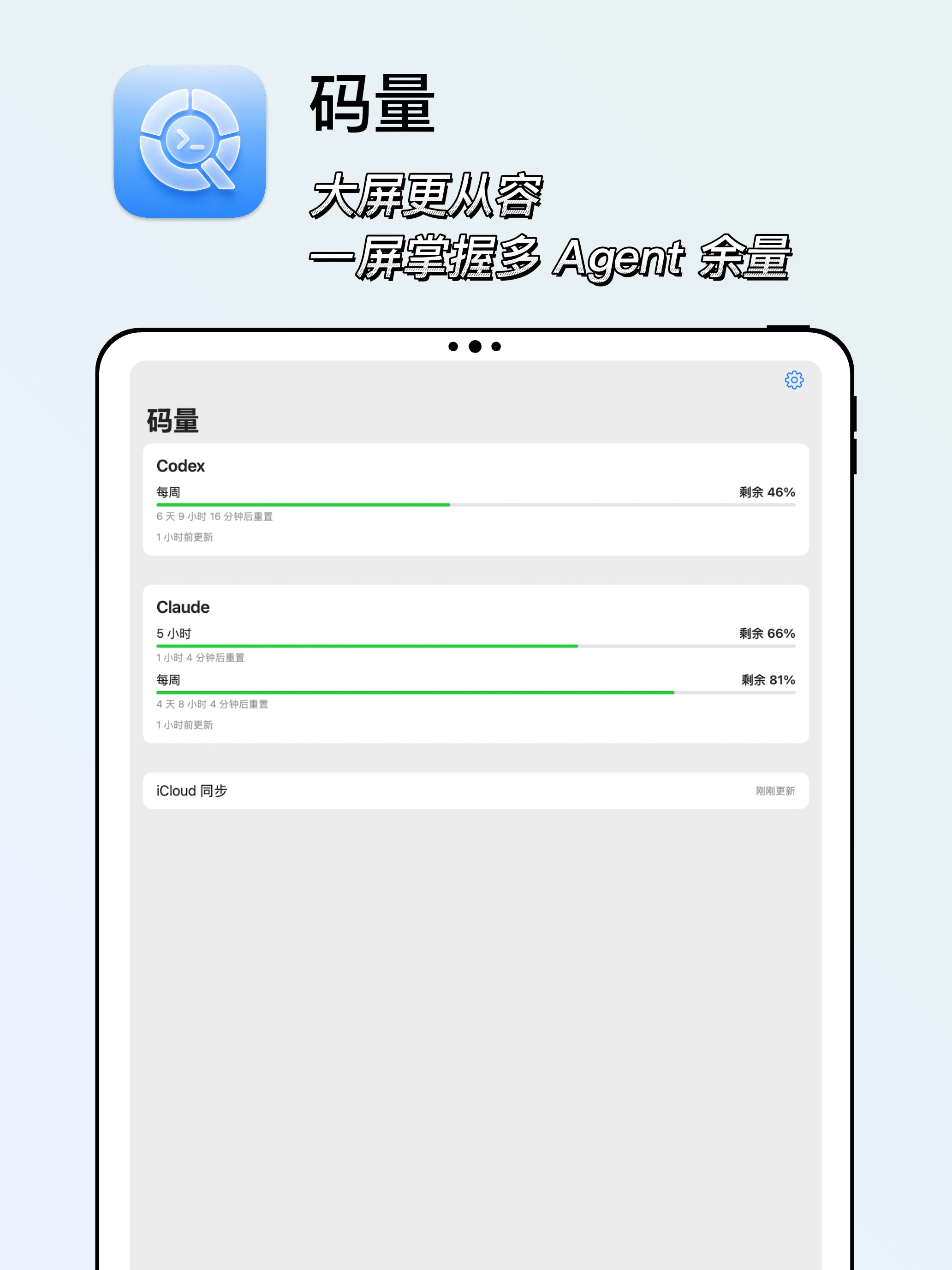
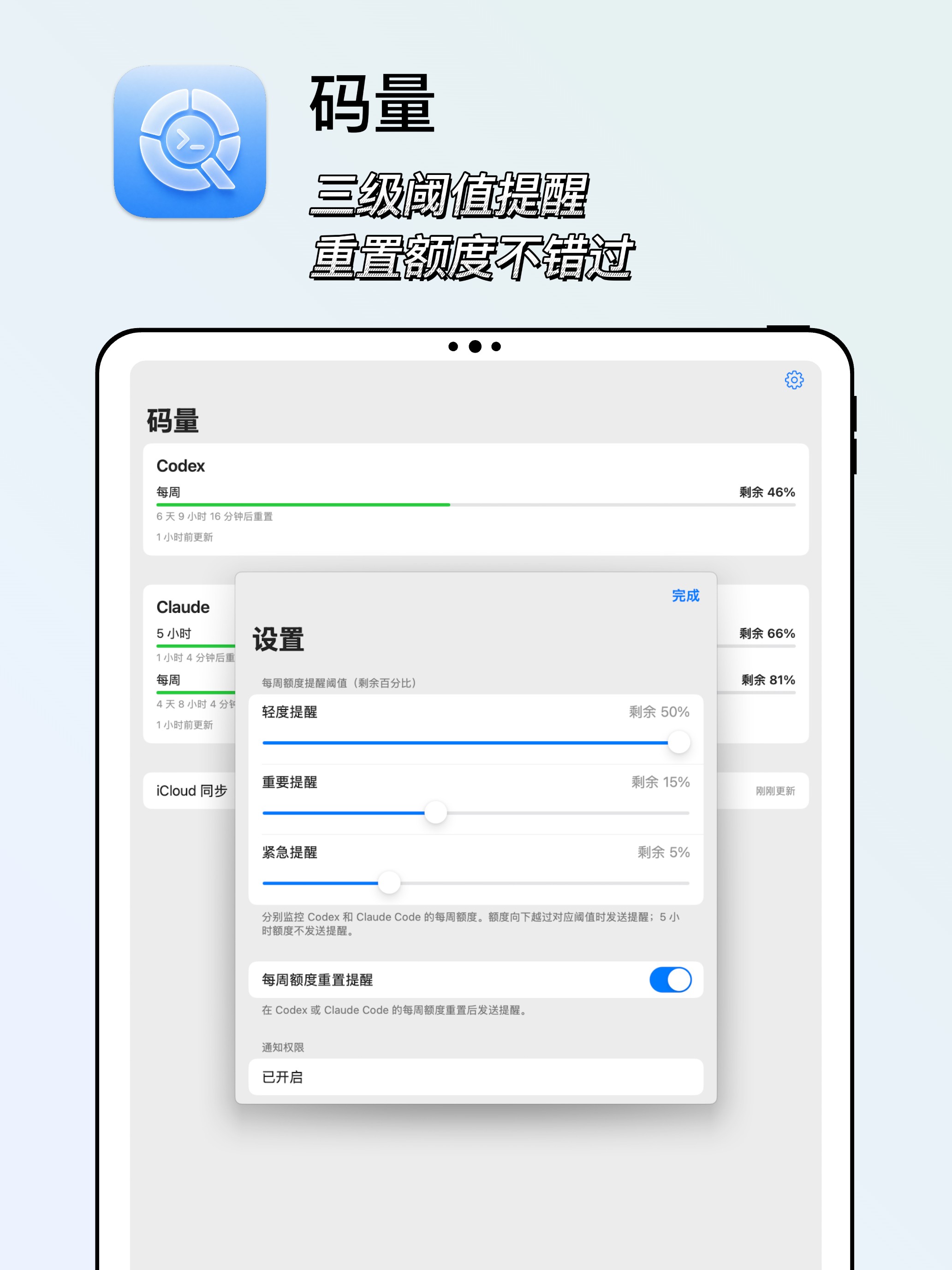
The same app in a wider layout: every agent's remaining quota on one screen, with settings opening as an overlay.
同一个 App,在 iPad 上用更宽的版式呈现:一屏之内看完多个 Agent 的余量,设置以浮层形式打开。
- Identical to iPhone, including sign-in, alerts, widgets and iCloud sync status.
- 功能与 iPhone 端完全一致,包括登录、提醒、小组件与 iCloud 同步状态。
- Sharing readings with your other devices requires the same Apple Account everywhere.
- 要和其它设备共享读数,几台设备需要登录同一个 Apple 账户。
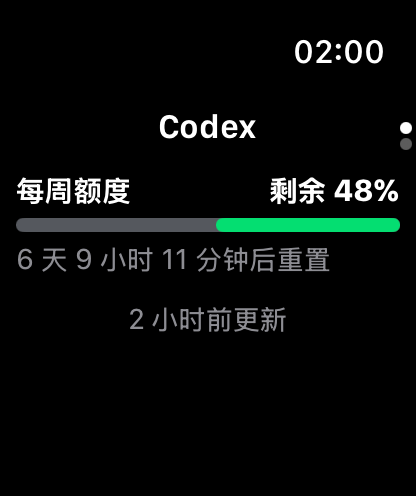
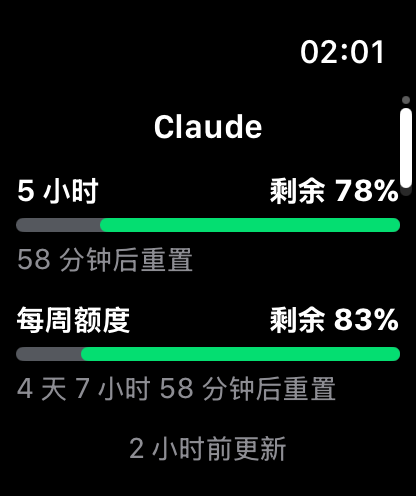
Two pages, switched with the Digital Crown or a swipe: Codex first, Claude second. Read the bars like this — grey is what you have used, colour is what is left.
主界面两页,用 Digital Crown 或上下滑动切换:第一页 Codex,第二页 Claude。条形图的读法是——灰色 = 已经用掉的,彩色 = 还剩的。
- To add a complication: press and hold the watch face → Edit → pick a slot → find QuotaGlance → choose "Claude quota" or "Codex quota".
- 添加复杂功能:长按表盘 → 编辑 → 选择位置 → 找到「码量」,选「Claude 额度」或「Codex 额度」。
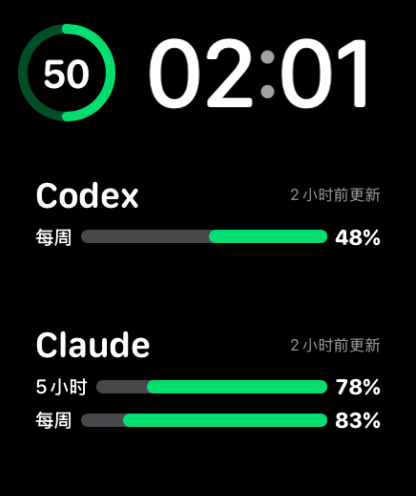
- The circular complication leads with the 5-hour limit; the rectangular one shows both windows plus data freshness.
- 圆形默认突出 5 小时额度;矩形同时显示 5 小时和每周两条,以及数据新鲜度。
- Push from iPhone (fast): arrives almost as soon as your phone has a new reading, but the phone has to be nearby.
- iPhone 推送(快):手机一拿到新数据就推过来,几乎即时,但需要 iPhone 在附近。
- Watch reads iCloud itself (slower, independent): every 5 minutes, as long as the watch is online and signed in to iCloud — your phone does not need to be around.
- 手表自读 iCloud(慢但独立):每 5 分钟一次,只要手表联网并登录 iCloud,手机不在身边也能更新。
- The watch itself never signs in to a provider. It only displays readings that reached it through one of those two channels.
- 手表本身不登录任何服务商,只展示经上述两条通道到达的读数。
watchOS 11 and earlier have no parameter editor for complications, which is why these ship as two ready-made entries rather than something you configure after adding. Refreshes are scheduled by the system (roughly every 15 minutes), so do not expect second-by-second updates. Offline, the last reading stays on screen.
watchOS 11 及更早版本没有复杂功能的参数编辑界面,所以这里做成了两个预配置条目,而不是加完再进去改。刷新由系统调度(约每 15 分钟),不要期待秒级更新;离线时继续显示上次读数。
The Mac app is an optional second collector, and a menu-bar-only tool: no Dock icon, no window. Launch it and a QuotaGlance icon appears at the top right; click it for the panel.
Mac 端是可选的第二个采集端,也是纯菜单栏工具:没有 Dock 图标、没有窗口。启动后在屏幕右上角出现「码量」图标,点开就是显示面板。
Download the latest notarized DMG, open it, and drag QuotaGlance to Applications. The current Mac version is 0.3.0 and needs macOS 14 or later.
下载最新版已公证 DMG,打开后将「码量」拖入「应用程序」。当前 Mac 版为 0.3.0,需要 macOS 14 或更高版本。
Open QuotaGlance.app from Applications; its icon appears in the menu bar.
从应用程序中打开 QuotaGlance.app,菜单栏出现「码量」图标。
For Codex click Sign in to ChatGPT; for Claude click Sign in to Claude, and finish authorizing in your browser. Connecting one is fine, and signing in directly requires neither the Codex CLI nor Claude Code.
Codex 点「登录 ChatGPT 账号」,Claude 点「登录 Claude 账号」,在浏览器里完成授权。只连接一个也可以,账号直连不要求安装 Codex CLI 或 Claude Code。
It collects immediately at launch, then checks every 2 minutes in the background. Opening the menu also triggers a check, and Refresh now forces a fresh query.
App 启动时立即采集,之后每 2 分钟后台检查一次。打开菜单也会触发检查,点「立即刷新」会强制查询最新数据。
After the first provider connects, enable Launch at Login when prompted. You can change it later in Settings, where the switch stays synchronized with macOS Login Items.
第一个 Provider 成功连接后,可按提示开启「登录时启动」。之后可在设置中修改,开关会与 macOS 登录项保持同步。
Signed builds check for updates automatically. Use Settings → Check for Updates… to check immediately.
正式签名版本会自动检查更新,也可在「设置 → 检查更新…」立即检查。
Sign out next to an account only clears that account's local sign-in. The Quit at the bottom of the panel closes the app and stops both collection and iCloud updates.
账号行右侧的「退出」只删除对应账号的本机登录状态;面板最下方的「退出」才会关闭 App,并停止采集和 iCloud 更新。
The older setup still works: a Codex CLI you have already installed and signed in to can serve as the Codex source, and Claude Code's status line plus ~/.claude/.credentials.json can act as a local fallback for Claude. These fallbacks are macOS-only.
原来的方式仍然可用:已安装并登录的 Codex CLI 可以作为 Codex 数据源;Claude Code 状态栏和 ~/.claude/.credentials.json 可以作为 Claude 的本机回退路径。这些回退路径只存在于 macOS。
| Panel message | What it means | What to do |
|---|---|---|
| 面板提示 | 含义 | 你要做的 |
| Codex not connected | You have not signed in to ChatGPT in the app, and no usable Codex CLI was found locally | Click "Sign in to ChatGPT". To use the CLI instead, install it and run |
| 尚未连接 Codex | 没有在 App 内登录 ChatGPT,且本机也找不到可用的 Codex CLI | 点「登录 ChatGPT 账号」;想使用 CLI,也可以安装后在终端运行 |
| Account not connected | No direct sign-in saved for this service. If quota is still showing, it is coming from a local fallback | Click sign in if you want a direct connection; otherwise leave it as is |
| 账号未连接 | App 内没有保存这个服务的直连账号;已有额度时表示正在使用本机回退数据 | 想使用账号直连就点右侧登录,否则可以保持现状 |
| Waiting for browser authorization… | The app opened your browser and is waiting for the result | Finish authorizing in the browser, or click Cancel to stop |
| 等待浏览器授权… | App 已打开浏览器,正在等待授权结果 | 在浏览器中完成授权;不想继续可以点「取消」 |
| Claude Code status line not configured | There is no Claude data, and Claude Code has not reported quota to the app | Just click "Sign in to Claude", or click "Set up" to use the status line instead |
| 尚未配置 Claude Code 状态栏 | 当前没有 Claude 数据,且 Claude Code 还没有向本 App 上报额度 | 可以直接点「登录 Claude 账号」;想使用状态栏则点「一键配置」 |
| Status line already used by another command | You have another statusLine tool configured | Sign in to Claude instead, or click "Overwrite and set up" — your original settings are backed up to |
| 状态栏已被其它命令占用 | 你已经配置了别的 statusLine 工具 | 可以直接登录 Claude;或点「覆盖并配置」,原设置会先备份到 |
| Waiting for Claude Code's first report | The status line is set up, but Claude Code has not completed a request yet | Send one message in any Claude Code session and quota appears. This is not an error |
| 等待 Claude Code 首次上报 | 状态栏配置成功了,但 Claude Code 还没完成过请求 | 去任意 Claude Code 会话里发一条消息,额度就会出现。这不是错误 |
Get started
快速上手
Running in three steps
三步跑通
Step 1 is all you strictly need. Steps 2 and 3 are for putting the number where you will actually see it.
严格来说只有第一步是必须的。第二、三步是把这个数字放到你真正看得见的地方。
1 · Sign in on iPhone
1 · 在 iPhone 上登录
Install the app from the App Store, open Settings and sign in to Claude or Codex. Your quota appears — no Mac required. Set your alert thresholds while you are there.
从 App Store 安装,打开设置页登录 Claude 或 Codex,额度立刻出现——不需要 Mac。顺手把提醒阈值也设好。
2 · Add widgets and complications
2 · 加小组件和表盘
Install the watch app from the Watch app on your iPhone. Add widgets to your Home or Lock Screen, and put "Claude quota" or "Codex quota" on your watch face.
在 iPhone 的 Watch App 里把码量装到手表;主屏 / 锁屏添加小组件,表盘上添加「Claude 额度」或「Codex 额度」。
3 · Optional: add your Mac
3 · 可选:加上你的 Mac
Install QuotaGlance.app and sign in from the menu bar panel, or point it at a Codex CLI or Claude Code you already use. Keep every device on the same Apple Account so readings sync. Adding it to your login items is recommended.
安装 QuotaGlance.app,在菜单栏面板里登录,或让它接上你已经在用的 Codex CLI / Claude Code。几台设备保持同一个 Apple 账户,读数才能互通。建议把它加进登录项。
Glossary
文案速查
What the words on screen mean
界面上这些字是什么意思
- 73% left
- 73% of this quota window remains. Every device shows what is left, never what you have used.
- 剩余 73%
- 这个额度窗口还剩 73%。三端一律显示剩余,不显示已用。
- Resets in 1 h 42 m
- How long until this quota window resets, computed live from your local time.
- 1 小时 42 分钟后重置
- 距离额度窗口重置还有多久,由本地时间实时计算。
- Probably reset
- The reset time has passed, but no new reading has confirmed it yet. Use the tool once and it refreshes.
- 预计已重置
- 重置时间已过,但还没收到新读数确认。去用一次对应工具即可刷新。
- Reset time unknown
- This reading did not carry a reset time.
- 重置时间未知
- 这次读数里没带重置时间。
- Updated just now / 12 minutes ago
- How fresh the reading is — not the reset time. If it is more than an hour old, whatever collects your quota has probably stopped.
- 刚刚更新 / 12 分钟前更新
- 数据采集时间的新鲜度,不是重置时间。超过一小时通常说明采集端停了。
- Source: account
- Read directly using the account you signed in to in the app.
- 数据源:账号直连
- 使用你在 App 内登录的账号直接读取。
- Source: Codex CLI
- Codex quota came from a Codex CLI already signed in on this Mac.
- 数据源:Codex CLI
- Codex 额度来自本机已经登录的 Codex CLI。
- Source: status line
- Claude quota came from the cache Claude Code's status line just wrote on this Mac.
- 数据源:StatusLine
- Claude 额度来自 Claude Code 状态栏刚刚写入的缓存。
- Source: OAuth usage
- Claude quota came from the usage endpoint. The credentials are either your in-app sign-in or, on a Mac, Claude Code's local credential file.
- 数据源:OAuth Usage
- Claude 额度来自 OAuth Usage 接口;凭据可能来自 App 内登录,也可能来自本机 Claude Code 凭据文件。
- Refresh failed, showing older data
- The latest attempt failed, so what you see is the previous reading. It will not pretend to be new.
- 刷新失败,正在显示旧数据
- 新一次采集失败,屏幕上是上一次的数值,不会假装是新的。
- Synced at 21:14
- When the last successful push to iCloud happened.
- 同步于 21:14
- 上次成功推送到 iCloud 的时间。
- Not synced yet
- No sync has ever succeeded.
- 尚未同步
- 从没成功同步过。
- No data
- Nothing has ever been collected or synced for this service. Sign in on this device, or check that a Mac has collected at least once.
- 暂无数据
- 这个服务一次都没采集 / 同步成功过。在本机登录,或确认 Mac 已经成功采集过一次。
FAQ
常见问题
When something goes wrong
遇到问题怎么办
Sign-in is stuck on "Waiting for browser authorization…"
Why: Authorization hasn't finished in the browser, or the authorization page never returned to the app.
Fix: Complete the authorization in your browser. It times out after 5 minutes; you can also tap Cancel and retry.
点登录后一直显示「等待浏览器授权…」
原因:浏览器授权还没完成,或授权页面没有成功返回 App。
处理:在浏览器里完成授权;超过 5 分钟会超时,也可以先点「取消」再重试。
Sign-in says a local port is in use
Why: Signing in to Codex needs port 1455 or 1457; signing in to Claude needs port 54545.
Fix: Quit the other QuotaGlance instance, codex login, or whatever else holds the port, then tap Retry.
登录时提示本机端口被占用
原因:Codex 登录需要端口 1455 或 1457,Claude 登录需要端口 54545。
处理:关闭另一个「码量」实例、codex login 或其它占用端口的程序,再点「重试」。
My sign-in expired, or I'm told I'm not authorized
Why: The credentials QuotaGlance saved have expired or been revoked. On a Mac, the local Claude Code credentials may have expired instead.
Fix: For accounts you signed in to inside QuotaGlance, tap Sign out and sign in again. If you're relying on Claude Code's own credentials, sign in again in Claude Code.
账号登录失效或提示未授权
原因:App 内保存的凭据已过期或被撤销;在 Mac 上也可能是本机 Claude Code 凭据失效。
处理:App 内登录的账号,请先点「退出」再重新登录。如果用的是 Claude Code 自己的凭据,请在 Claude Code 中重新登录。
It says "Account not connected" but my quota still updates
Why: On a Mac, the app is reading through the Codex CLI, Claude's status line, or Claude Code's credential file instead of your own sign-in.
Fix: Nothing is wrong. Tap the matching sign-in button whenever you'd rather connect your account directly.
显示「账号未连接」,但额度仍在更新
原因:在 Mac 上,App 正在通过 Codex CLI、Claude StatusLine 或 Claude Code 凭据文件取数,而不是你自己的登录。
处理:这是正常的。想改用账号直连时,再点对应的登录按钮。
My iPhone or Apple Watch shows "No data"
Why: You haven't signed in on this iPhone, and no Mac has collected anything yet — or your devices aren't all on the same Apple Account.
Fix: Sign in to Claude or Codex in Settings on your iPhone; that alone is enough, with no Mac involved. If you'd rather have a Mac collect it, check that the Mac app shows numbers and that its iCloud row is healthy, then confirm all your devices use the same Apple Account.
iPhone 或 Apple Watch 一直「暂无数据」
原因:这台 iPhone 还没登录,也还没有任何 Mac 采集过数据;或者几台设备不在同一个 Apple 账户下。
处理:在 iPhone 设置页登录 Claude 或 Codex 即可,全程无需 Mac。如果你更想让 Mac 采集,先看 Mac 面板是否有数值、iCloud 行是否正常,再核对各台设备的 Apple 账户是否一致。
My Mac has data but my iPhone doesn't
Why: iCloud sync is failing, or the iCloud container isn't configured.
Fix: Read the red error on the Mac app's iCloud row. You can also just sign in on the iPhone and skip the Mac entirely.
Mac 有数据,iPhone 没有
原因:iCloud 同步失败,或 iCloud 容器没配好。
处理:看 Mac 上 iCloud 那行的红色错误。你也可以直接在 iPhone 上登录,完全跳过 Mac。
Claude is stuck on "Waiting for Claude Code's first report"
Why: On a Mac using the status line, quota only appears after a session completes a model request.
Fix: Send one message in any Claude Code session. Or sign in to your Claude account in the app and skip the status line.
Claude 一直「等待 Claude Code 首次上报」
原因:在 Mac 上走 statusLine 时,额度要等会话完成一次模型请求后才会出现。
处理:去任意 Claude Code 会话发一条消息;或者在 App 内登录 Claude 账号,跳过 statusLine。
Claude is configured but still has no data, and reports a missing built-in component
Why: The app bundle is incomplete and the native helper wasn't packaged correctly.
Fix: Rebuild or install the latest Mac app, then run the one-tap setup again.
Claude 配置好了还是长期没数据,并提示内置组件缺失
原因:App 包不完整,原生 helper 没有正确打包。
处理:重新编译 / 安装最新版 Mac App,再点一次「一键配置」。
Codex reports "codex app-server exited unexpectedly"
Why: The app is on the Codex CLI fallback path, and the CLI isn't signed in.
Fix: Run codex login in a terminal, or just sign in to your ChatGPT account inside the app.
Codex 报「codex app-server 意外退出」
原因:当前走 Codex CLI 回退路径,但 CLI 没有正确登录。
处理:终端执行 codex login,或直接在 App 内登录 ChatGPT 账号。
Codex reports a response timeout
Why: This happens occasionally; the app restarts app-server and retries once on its own.
Fix: Wait for the next round, or tap Refresh now.
Codex 报「等待响应超时」
原因:偶发,App 会自动重启 app-server 重试一次。
处理:等下一轮,或点「立即刷新」。
I keep tapping refresh and get nothing
Why: You've hit the provider's rate limit (429). The app honors the retry interval it's given.
Fix: Wait until the time shown, and don't tap repeatedly.
反复点刷新后拿不到数据
原因:触发了服务接口限流(429),App 会遵守重试间隔。
处理:等到提示的时间后再刷新,不要连续点击。
My Watch data is older than my iPhone's
Why: The Watch reads iCloud on its own only every 5 minutes.
Fix: Open the Watch app once, or tap Retry. It updates faster when your iPhone is nearby.
手表数据比手机旧
原因:手表自己 5 分钟才读一次 iCloud。
处理:打开一次手表 App 或点「重试」;iPhone 在附近时会更快。
I don't get any alerts
Why: Notification permission is off, or you're watching your 5-hour limit.
Fix: Check notification permission in Settings. The 5-hour limit never sends notifications by design — only the weekly limit does.
收不到任何提醒
原因:通知权限没开,或你盯的是 5 小时额度。
处理:在设置页检查通知权限。5 小时额度本来就不发通知,只有每周额度会。
My widget or complication isn't updating
Why: The system decides when to refresh it.
Fix: This is normal — roughly every 15 minutes. Opening the main app prompts a refresh.
小组件 / 表盘不更新
原因:刷新时机由系统决定。
处理:正常现象,约 15 分钟一次;打开主 App 会促使它刷新。
The numbers stopped moving after I quit the Mac app
Why: If you haven't signed in on your iPhone, the Mac is your only collector, and it stopped.
Fix: Sign in on your iPhone so it reads quota on its own, or reopen the Mac app and add it to your login items.
关掉 Mac App 后数值不动了
原因:如果你没在 iPhone 上登录,Mac 就是唯一的采集端,而它停了。
处理:在 iPhone 上登录,让它自己读取额度;或者重新打开 Mac 版并加进登录项。
Is this an official Anthropic or OpenAI app?
No. QuotaGlance is an independent app, not affiliated with, endorsed by, or sponsored by either company. It uses your own sign-in to read usage data for accounts you already have.
这是 Anthropic 或 OpenAI 的官方应用吗?
不是。码量是一款独立开发的应用,与两家公司均无隶属、认可或赞助关系。它使用你自己的登录,读取你本就拥有的账号的用量数据。
Privacy
隐私
Only four numbers ever leave your device
只同步该同步的四个数值
QuotaGlance reads only your usage quota: how much of your session and weekly limits remains, and when they reset. It never reads your prompts, your code, your conversations, or your project names. It has no developer-operated server and contains no third-party analytics, advertising, or crash-reporting SDK.
码量只读取你的用量额度:会话额度与每周额度还剩多少、什么时候重置。它不读取你的提示词、代码、对话内容或项目名称。它没有开发者自有的服务器,也不含任何第三方分析、广告或崩溃统计 SDK。
Synced to your own private iCloud database
- Service name (Codex / Claude)
- Percentage left
- Reset time
- Capture time
会同步到你自己的 iCloud 私有数据库
- 服务名(Codex / Claude)
- 剩余百分比
- 重置时间
- 采集时间
Never synced to iCloud
- Your code
- Your conversations
- Project names and file paths
- Account names
- Sign-in tokens
不会同步到 iCloud
- 代码
- 对话内容
- 项目名称与文件路径
- 账号名称
- 登录 Token
Where your sign-in lives. When you sign in, the credentials stay in that device's own keychain, marked "this device only." They are never written to iCloud, never included in a backup, and never leave the device that obtained them. Tokens are used solely as the authorization header on that provider's own sign-in and usage endpoints — they are never logged, never written to an app cache, never uploaded to iCloud, and never sent to the developer or any third party. The app never uses them to send model requests. On a Mac, if you have not signed in to Claude in the app, it may read ~/.claude/.credentials.json; it does not read Claude Code's keychain item and does not read or rewrite Claude Code's refresh token.
你的登录凭据存在哪里。登录后,凭据保存在这台设备自己的钥匙串里,标记为「仅本机」。它们不会写入 iCloud、不会进入备份,也不会离开获取它们的那台设备。Token 只作为对应服务商登录与用量接口的授权头使用——不写日志、不写业务缓存、不上传 iCloud,也不会发送给开发者或任何第三方;App 不用它发送模型请求。在 Mac 上,如果你没有在 App 内登录 Claude,它才会尝试读取 ~/.claude/.credentials.json;它不会读取 Claude Code 的钥匙串条目,也不会读写 Claude Code 的 refresh token。
Do I need a Mac? A Mac is optional. Sign in on iPhone and it reads your quota directly, with no Mac involved. If you prefer not to sign in on iPhone, the Mac app can collect quota and sync it to your iPhone and Apple Watch through your own private iCloud database.
我需要 Mac 吗?Mac 是可选的。在 iPhone 上登录,它就直接读取你的额度,全程无需 Mac。如果你不想在 iPhone 上登录,也可以由 Mac 版采集,经你自己的 iCloud 私有数据库同步到 iPhone 与 Apple Watch。

Put your quota where you can see it
把额度放在抬手可见的地方
Sign in once on your iPhone. That's the whole setup.
在 iPhone 上登录一次,整个配置就结束了。